Turn a product update into a LinkedIn post buyers can use
A practical guide for founders: explain one changed customer task, show the limits, and turn verified release notes into a reviewable LinkedIn draft.
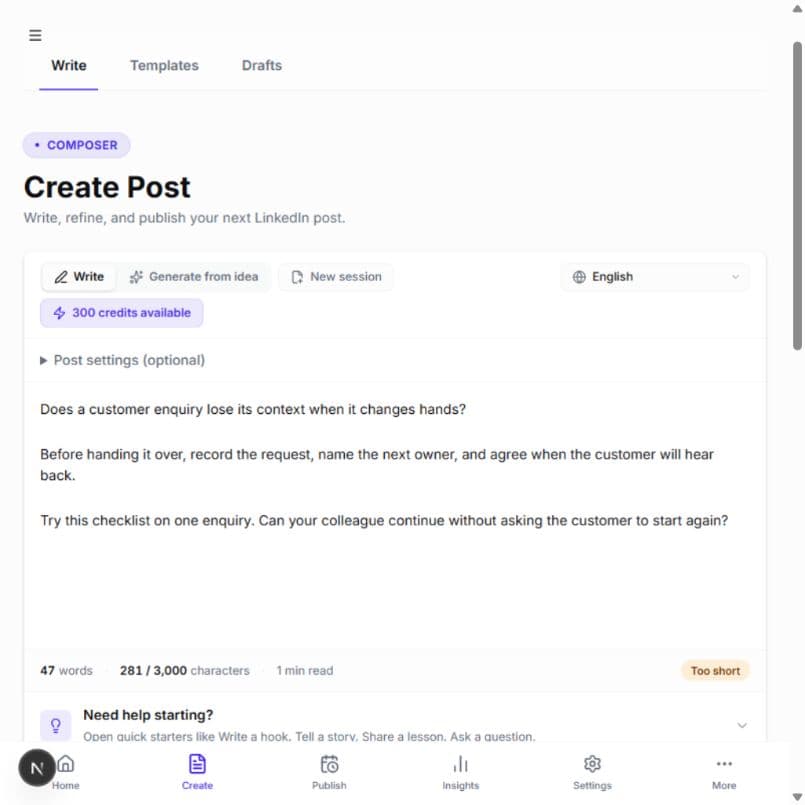
What belongs in a product-update post on LinkedIn?
Explain who the change helps, what they can now do, how to try it and what still requires care. Start with the customer's task, not your release number. A buyer should be able to decide whether the update is relevant without translating a list of features into a workflow.
For a founder writing between product releases, the hard part is choosing what to leave out. This guide turns one verified change into one post. HumanEcho can help develop your notes into an editable Arabic or English draft; checking that the feature works and is available remains your responsibility.
Choose one task from the release notes
Suppose a fictional inventory tool adds CSV export, a new dashboard color and a faster settings search. A shop manager preparing a weekly stock review may care most about the export. Write about that task. Keep the other changes in the full release notes rather than forcing all three into the opening line.
From a feature label to a usable explanation
- Feature-led
- New release: CSV export, refreshed dashboard and improved search. A major upgrade for every team.
- Task-led
- Preparing a weekly stock review? Export the current inventory list as a CSV, then open it in your spreadsheet. Check the exported fields before using the file in another system.
Hypothetical editorial examples, not HumanEcho features or measured product outcomes.
The second version says what the reader can do without claiming an integration, automatic synchronization or time saving. If export access depends on a plan, role or rollout stage, say so near the instructions. Do not describe a beta or a planned release as available to everyone.
Give the writing tool a small, factual brief
- Reader and task: a shop manager preparing the weekly stock review.
- Verified change: a downloadable CSV of the current inventory list.
- Availability: the actual plans, roles and rollout status from your release owner.
- Limit: a downloaded file is a snapshot, not a live connection.
- Next action: a working guide or product link that you have tested.
Use public release facts, not private tickets, customer names or internal screenshots. Add an instruction such as: “Write for shop managers. Explain the task in plain language. Do not invent customer quotes, performance numbers, integrations or features.” Replace any unknown with a question for your team before drafting, not a confident sentence in the post.
See the brief become a complete post
Open the release brief and example post
Prepared editorial example for a fictional inventory product. It is not a customer story or live HumanEcho output.
- Release brief
- Reader: shop manager preparing a weekly stock review Change: export the current inventory list as CSV Availability: assume all signed-in users for this fictional example only Limit: a snapshot; no automatic sync Next action: open the inventory list and choose Export CSV
- Example LinkedIn post
- Preparing your weekly stock review in a spreadsheet? You can now export the current inventory list as a CSV. Open the inventory list, choose Export CSV, then open the downloaded file in your spreadsheet. Review the columns before adding your own notes or passing the file to another system. The download is a snapshot. It will not update when the inventory changes, and editing the spreadsheet will not change the inventory in the app. Export again when you need a fresh copy. Start with one stock review and check whether the file includes the fields you need. If a field is missing, tell us which review task it supports.
Before adapting this example, replace the fictional availability and steps with your own verified details. The closing question asks for useful product feedback, not an empty “Agree?” It also avoids promising that an export solves the buyer's whole stock-management process.
Draft in HumanEcho, then compare every claim with the release
Start with your own idea and enter the cleaned brief. Choose the writing language, generate a draft, and edit it against the release notes. Optional writing samples can guide your style; they do not validate feature availability. Remove any claim the draft added without evidence.
Check the opening, the steps and the limitation separately. If you attach a screenshot to the eventual LinkedIn post, use your real interface with private information removed and label demo data. An illustration can explain the workflow, but it should not look like proof of a result you have not measured.
Save the reviewed draft. Saving is separate from scheduling or publishing, so you can confirm the release is live before choosing a publishing step. If the rollout changes, revise the saved text and its destination link before it reaches readers.
For repeated drafting and revision, compare current HumanEcho plans and terms. Need to explain why you chose an approach rather than announce a release? Read the technical trade-off writing guide.
